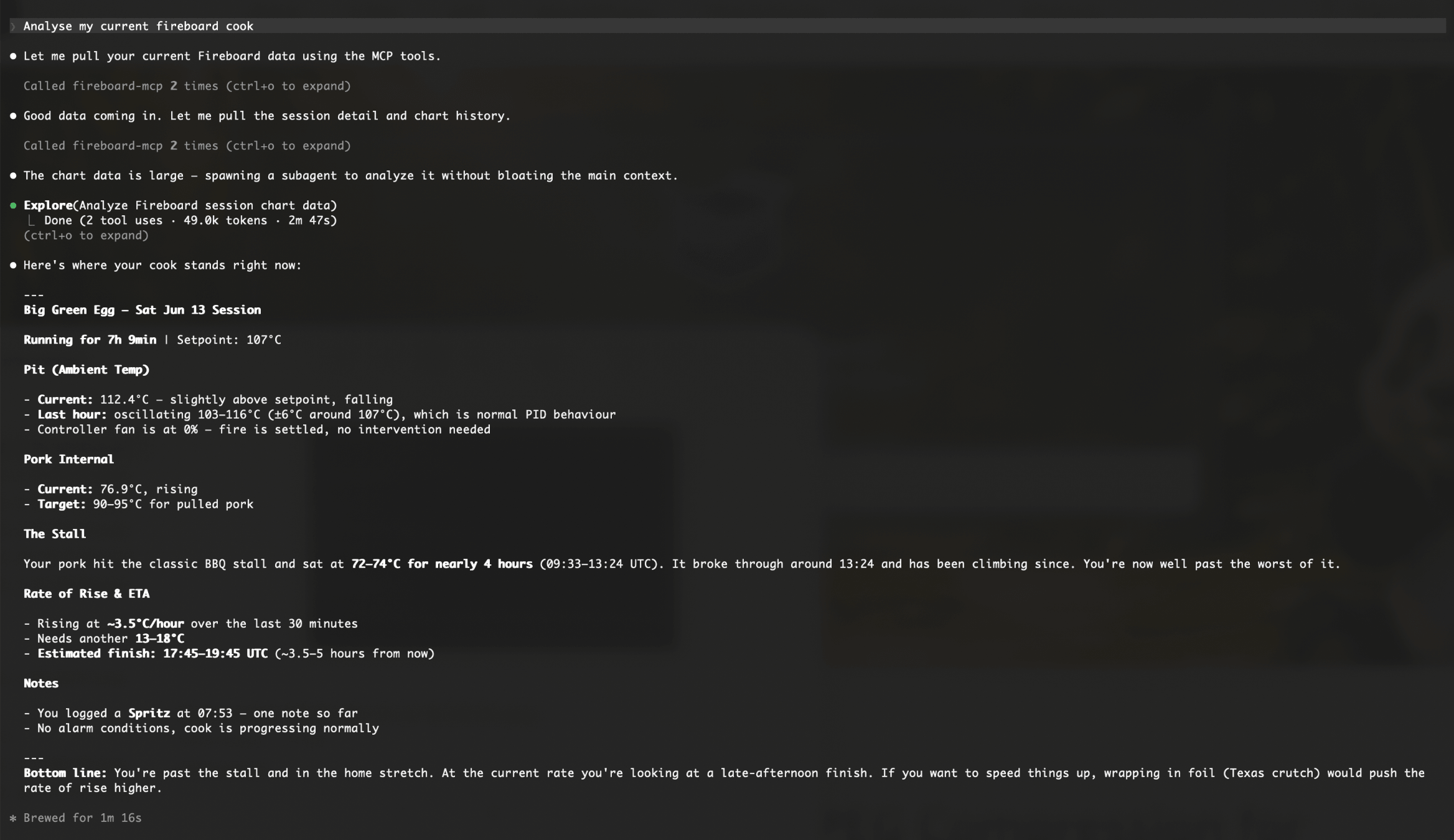
Claude Code giving a full cook analysis — stall history, rate of rise, and ETA.
An MCP server that exposes the Fireboard BBQ temperature monitoring API to AI assistants — ask questions about live probe readings, in-progress cooks, historical session data, drive fan status, stall detection, and more. Includes Drive control tools to set target temperature, fan speed, and control channel.
https://fireboard-mcp.up.railway.app/mcp
The Fireboard API is rate-limited to 17 calls per 5-minute window across all tools. Exceeding this blocks all requests for ~5 minutes. Each tool's call cost is shown below when expanded. To reduce API usage, the device list is cached server-side per token for 2 minutes — tools sourced from it cost 0 calls when the cache is warm.
All Fireboard devices on the account. Device list is cached server-side for 2 minutes — repeated calls within that window are free.
{ }
Example response
{
  "devices": [
    {
      "uuid": "abc-123",
      "id": 246277,
      "title": "Big Green Egg",
      "model_name": "FireBoard 2 Pro",
      "channel_count": 3,
      "battery": 0.47,
      "channels": [
        { "id": 53744333, "channel": 1, "label": "Ambient Temp", "alerts": [
          { "id": 11280417, "temp_min": 95.0, "temp_max": 130.0, "notify_app": true,
            "notify_email": false, "notify_sms": false, "time_start": "00:00:00",
            "time_stop": "23:59:00", "minutes_buffer": 0, "minutes_repeat": 30, "enabled": true }
        ]},
        { "id": 53744334, "channel": 2, "label": "Pork Internal", "alerts": [] }
      ]
    }
  ],
  "from_cache": true,
  "cache_age_seconds": 45
}
Current probe readings for all devices, or filtered by device name. Sourced from the same cached device list — no extra API calls when warm.
{ device_title?: string }
Example response
{
  "devices": [
    {
      "uuid": "abc-123",
      "title": "Big Green Egg",
      "channels": [
        { "label": "Probe 1", "temp": 74.4, "unit": "C", "as_of": "2026-06-13T13:00:00Z" },
        { "label": "Grill",   "temp": 109.2, "unit": "C", "as_of": "2026-06-13T13:00:00Z" }
      ],
      "last_drive": { "setpoint": 110, "drive_percent": 23, "mode": "1",
                      "tied_to_channel": 2, "tied_to_channel_label": "Grill", "unit": "C", "as_of": "2026-06-13T13:00:00Z" }
    }
  ],
  "from_cache": false,
  "cache_age_seconds": 0
}
Real-time FireBoard Drive fan %, setpoint, and control mode for a specific device. Uncached — use last_drive from get_realtime_temps if freshness isn't critical.
{ device_uuid: string }
Example response
{
  "device_uuid": "abc-123",
  "drive": {
    "setpoint": 110,
    "drive_percent": 23,
    "mode": "1",
    "tied_to_channel": 2,
    "tied_to_channel_label": "Grill",
    "unit": "C",
    "as_of": "2026-06-13T13:00:00Z"
  }
}
Set the Drive target temperature and/or control channel, switching to auto mode.
{ device_uuid: string, setpoint?: number, channel?: number }
Example response
{ "success": true }
Set the Drive fan to a fixed speed (manual mode), overriding any active setpoint. Setting speed to 0 turns the drive off.
{ device_uuid: string, percent: number }
Example response
{ "success": true }
Turn the Drive fan off by setting the setpoint to 0. Clears any active setpoint and stops the fan.
{ device_uuid: string }
Example response
{ "success": true }
Recent cook sessions. Use in_progress_only to find an active cook without scanning the full list.
{ limit?: number, in_progress_only?: boolean }
Example response
{
  "sessions": [
    {
      "id": 42,
      "title": "Pork Shoulder",
      "description": "1.25kg, Big Green Egg",
      "start": "2026-06-13T08:00:00Z",
      "end": null,
      "in_progress": true,
      "device_uuids": ["abc-123"]
    }
  ],
  "limit_applied": 20
}
Session metadata — title, timing, devices, channels, and cook notes. Use when you don't need temperature data.
{ session_id: number }
Example response
{
  "id": 42,
  "title": "Pork Shoulder",
  "description": "1.25kg, Big Green Egg",
  "start": "2026-06-13T08:00:00Z",
  "end": null,
  "in_progress": true,
  "duration_minutes": 300,
  "devices": [{ "uuid": "abc-123", "title": "Big Green Egg" }],
  "channels": [{ "label": "Probe 1", "device_uuid": "abc-123" }],
  "notes": [
    { "time": "2026-06-13T10:00:00Z", "text": "Stall started", "channel": null, "device_uuid": "abc-123" }
  ]
}
Probe time-series only — no metadata or notes. Use when you already have session context and just need the temperature readings.
{ session_id: number, include_drive?: boolean }
Example response
{
  "channels": [
    {
      "device_uuid": "abc-123",
      "label": "Probe 1",
      "unit": "C",
      "readings": [
        { "t": "2026-06-13T08:00:00Z", "temp": 20.1 },
        { "t": "2026-06-13T13:00:00Z", "temp": 74.4 }
      ]
    }
  ]
}
Full session data in one call — metadata, cook notes, and complete probe time-series. Use for cross-session comparison or stall analysis where you need both context and temperature data.
{ session_id: number, include_drive?: boolean }
Example response
{
  "session": {
    "id": 42,
    "title": "Pork Shoulder",
    "description": "1.25kg, Big Green Egg",
    "start": "2026-06-13T08:00:00Z",
    "end": null,
    "in_progress": true
  },
  "channels": [
    {
      "device_uuid": "abc-123",
      "label": "Probe 1",
      "unit": "C",
      "readings": [
        { "t": "2026-06-13T08:00:00Z", "temp": 20.1 },
        { "t": "2026-06-13T13:00:00Z", "temp": 74.4 }
      ]
    }
  ],
  "notes": [
    { "time": "2026-06-13T10:00:00Z", "text": "Stall started", "channel": null, "device_uuid": "abc-123" }
  ]
}
Ask questions about live cooks in plain language — stall analysis, probe comparisons, session history, and more.
Claude Code giving a full cook analysis — stall history, rate of rise, and ETA.
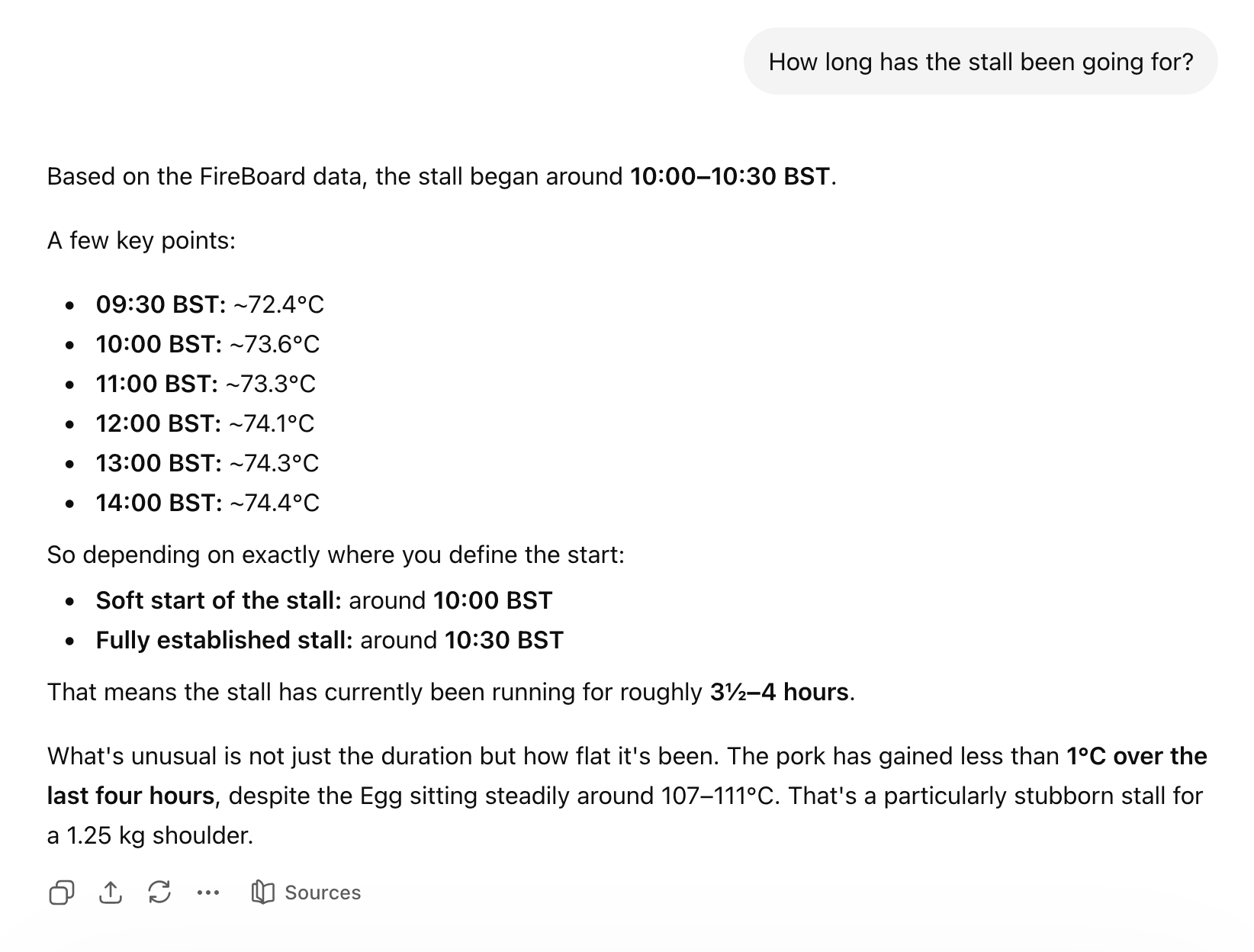
ChatGPT analysing a pork shoulder stall using live Fireboard probe data.
Add this server to your AI assistant using the MCP endpoint above. Each assistant has its own setup flow:
All clients use OAuth 2.0 — after adding the endpoint, you'll be prompted to sign in with your Fireboard credentials. Your credentials are sent directly to the Fireboard API and are not stored. Only the resulting access token is held in memory to authenticate tool calls on your behalf.
Go to Settings → Apps → Advanced Settings and enable Developer Mode. Then click Create app, set the connection type to Server URL, paste the MCP endpoint, and set authentication to OAuth. ChatGPT will auto-discover the OAuth settings. Acknowledge the custom server warning and click Create.
Go to Settings → Integrations, click Add integration, and paste the MCP endpoint URL. Claude will prompt you to authenticate with your Fireboard credentials before the tools become available.
Run this command in your terminal:
claude mcp add --transport http fireboard-mcp https://fireboard-mcp.up.railway.app/mcp
Claude Code will open a browser window to complete the OAuth login with your Fireboard credentials on first use.
MCP support is available in Gemini via the Google AI Studio and the Gemini API using the Agent Development Kit (ADK). Add the MCP endpoint as a remote tool — the OAuth flow will be triggered on first use.